

Contact options
 5.0 / 5Google reviews
Coordinated Deployment and Maintenance for Your Business
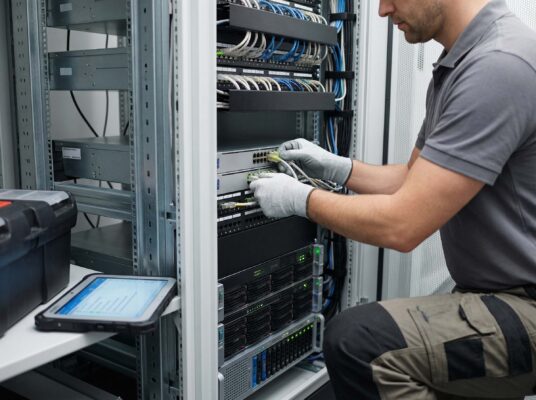
DK’S Enterprises, Ltd. plans, installs, and maintains the hardware your business runs on. Our business IT infrastructure setup brings servers, networks, workstations, cabling, and racks together in one coordinated project.
Since 1999, we have handled IT projects for shipping companies, medical centers, manufacturing facilities, and professional offices. We review the site and requirements, coordinate equipment and specialists, test the installation, and plan ongoing maintenance.
Our Inwood-based team handles infrastructure projects for businesses across the region.
Office: 159 Doughty Blvd, Suite 1, Inwood, NY 11096
What We Deploy and Maintain
We install and maintain business-grade hardware from manufacturers including Lenovo, HP, Cisco, and Fortinet.
Server and Network Components
- Server deployment coordinated with Server Installation and Maintenance
- Managed switches, routers, and firewall deployment (Cisco, Fortinet)
- Wireless access point placement, configuration, and coverage optimization
- UPS and power protection installation
- Physical cabling, patch panels, and cable management through Structured Cabling
- Network segmentation and VLAN configuration
Workstations and endpoint hardware
- Desktop and laptop deployment with standardized imaging
- Docking stations, monitors, and peripheral setup
- Printers, scanners, and multifunction device installation
- Conference room AV and display equipment
IT Infrastructure Maintenance Services
- Firmware and BIOS updates across network and server hardware
- Scheduled hardware health checks and diagnostics
- Replacement of drives, memory, and other components based on age and condition
- Documentation, including rack diagrams, IP address plans, and equipment inventories
- Equipment lifecycle tracking and replacement planning
- Performance checks and trend reviews
How We Handle Infrastructure Projects
We plan the work in the order it needs to happen, from cabling and equipment delivery to configuration and testing. Before handover, we check that the components work together and document the setup.
1. Assessment. We review your systems and site, identify gaps, and define the work. If new equipment is needed, we handle sourcing and vendor coordination.
2. Planning. We set the schedule, identify dependencies, and plan around your daily operations. Larger rollouts can be completed in stages to reduce disruption.
3. Deployment. We install, configure, and test equipment on-site, using your naming conventions, network policies, and security baselines.
4. Verification. We check connectivity, performance, access controls, and backup integration, then hand over the configuration records and test results.
5. Maintenance. We plan regular checks, updates, and monitoring based on the equipment and your business needs.
Typical Projects
- Office IT infrastructure installation – coordinated cabling, racks, networks, servers, and workstations for a new location
- Office relocations – disassembly, transport coordination, reinstallation, and validation at the new site
- Infrastructure refresh – replacing aging servers, switches, and firewalls with current-generation equipment
- Multi-site rollouts – standardized hardware deployments across multiple locations
- Infrastructure cleanup — reorganizing racks, labeling cabling, updating records, and correcting inconsistent settings
- Capacity expansion – adding network capacity, storage, or compute resources to support business growth
Why Planned Maintenance Matters
Regular checks help catch failing components, outdated firmware, and unsupported equipment. Keeping records current also makes troubleshooting and future upgrades easier.
Problems regular maintenance helps address:
- Firmware vulnerabilities that expose your network to known exploits
- Unnoticed drive deterioration or warning signs
- Configuration drift that causes intermittent, hard-to-diagnose problems
- End-of-life hardware running past vendor support with no replacement plan
- Undocumented changes that make troubleshooting slower and riskier
Who This Is For
- Businesses with 10–200 employees that need professional-grade infrastructure without a full-time IT staff
- Companies opening new offices or relocating existing operations
- Medical practices, law firms, and financial offices with compliance-sensitive environments
- Manufacturing and logistics operations that need dependable on-premises systems
- Organizations with infrastructure that has outgrown its original design
- Any business tired of reactive, break-fix IT support
Planning an Infrastructure Upgrade?
We help plan new office installations and upgrades to existing systems. For details on specific work, see our pages on server installation, network configuration, and structured cabling.
Contact us to discuss an infrastructure project. Existing clients can use Support for issues in their current environment.
FAQ
Start Your Infrastructure Project
Tell us about the office, equipment, or systems you want to improve. We’ll review the requirements and outline the work, timing, and next steps.
Our recommendations start with a review of your existing setup.
Share your site requirements, current equipment, and planned changes. We’ll explain what needs to happen, in what order, and how the installation can be maintained.