

Source and accuracy note
This guide is built primarily on the protocol specifications themselves — RFC 7489, RFC 7208, RFC 6376, RFC 8301, RFC 8463, RFC 8601, RFC 8617, RFC 8461, RFC 8460, RFC 7960, plus RFC 8553 and RFC 8616 where they update or affect RFC 7489 — supplemented by current Microsoft, Google, and Yahoo operational documentation, and by the active DMARCbis work in the IETF DMARC Working Group. DMARC is a policy advisory protocol: it expresses the domain owner’s preference, but the receiving mail system decides what to do with a failing message. Provider behavior changes, sometimes without notice. DNS examples in this article use reserved example-style placeholder names. Replace every policy domain, report domain, selector, and external-report authorization record with values controlled by your organization or report processor. Before applying any configuration described here to a production domain, validate it in a staged rollout — typically p=none with aggregate reporting — and never publish p=reject until aggregate reports confirm that your legitimate mail sources are aligned.
Introduction: why SMTP allows spoofing
SMTP, defined originally in RFC 821 (1982) and modernized in RFC 5321, was designed for a small, mutually trusted research network. It performs no authentication of the sender at the protocol level. A connecting mail server can present any value it likes in the MAIL FROM command and any address it likes in the From: header. The receiving MTA has no built-in way to verify either.
Email actually has three “from” identities, and confusing them is the root of most spoofing:
- The envelope sender (also called
MAIL FROM,Return-Path, or RFC 5321.MailFrom). This is the address used during the SMTP transaction and where bounces go. The recipient usually never sees it. - The header From (RFC 5322.From). This is the visible
From:line that mail clients render to the user. - The DKIM signing domain (the
d=tag inside a DKIM-Signature header). This is the domain whose key signed the message, and it may differ from both addresses above.
A phishing message can put billing@bank.example.com in the visible From: while using bounce@attacker.example.net as the envelope sender. SPF, in the usual MAIL FROM evaluation relevant to DMARC, validates the envelope sender rather than the visible From. SPF can also evaluate HELO/EHLO, but that is not the user-visible identity. DKIM, on its own, only validates whatever domain happens to have signed the message. Neither protects the identity the user actually sees in their mail client unless the authenticated identity aligns with the visible From domain under DMARC.
DMARC was defined in RFC 7489 in March 2015 with Informational status, published through the RFC Editor’s Independent Submission stream rather than as IETF working-group output. DMARCbis is the IETF DMARC Working Group’s Standards-Track revision of the protocol — a first IETF-stream specification of DMARC, not a “promotion” of an existing IETF document. DMARC ties SPF and DKIM results to the visible From domain through a concept called alignment, and it lets the domain owner publish a policy in DNS telling receivers what to do when neither aligned mechanism passes. DMARC is not a magic anti-phishing layer — it does nothing about lookalike domains, homoglyph attacks, or messages sent from compromised accounts that authenticate normally — and it does not guarantee inbox placement. What DMARC does provide is validation that use of the visible From domain was authorized for a passing message, plus a feedback channel so domain owners can see who is sending mail on their behalf. It is not a verdict that the message content, sender intent, or mailbox account is trustworthy.
SPF, DKIM, and DMARC roles
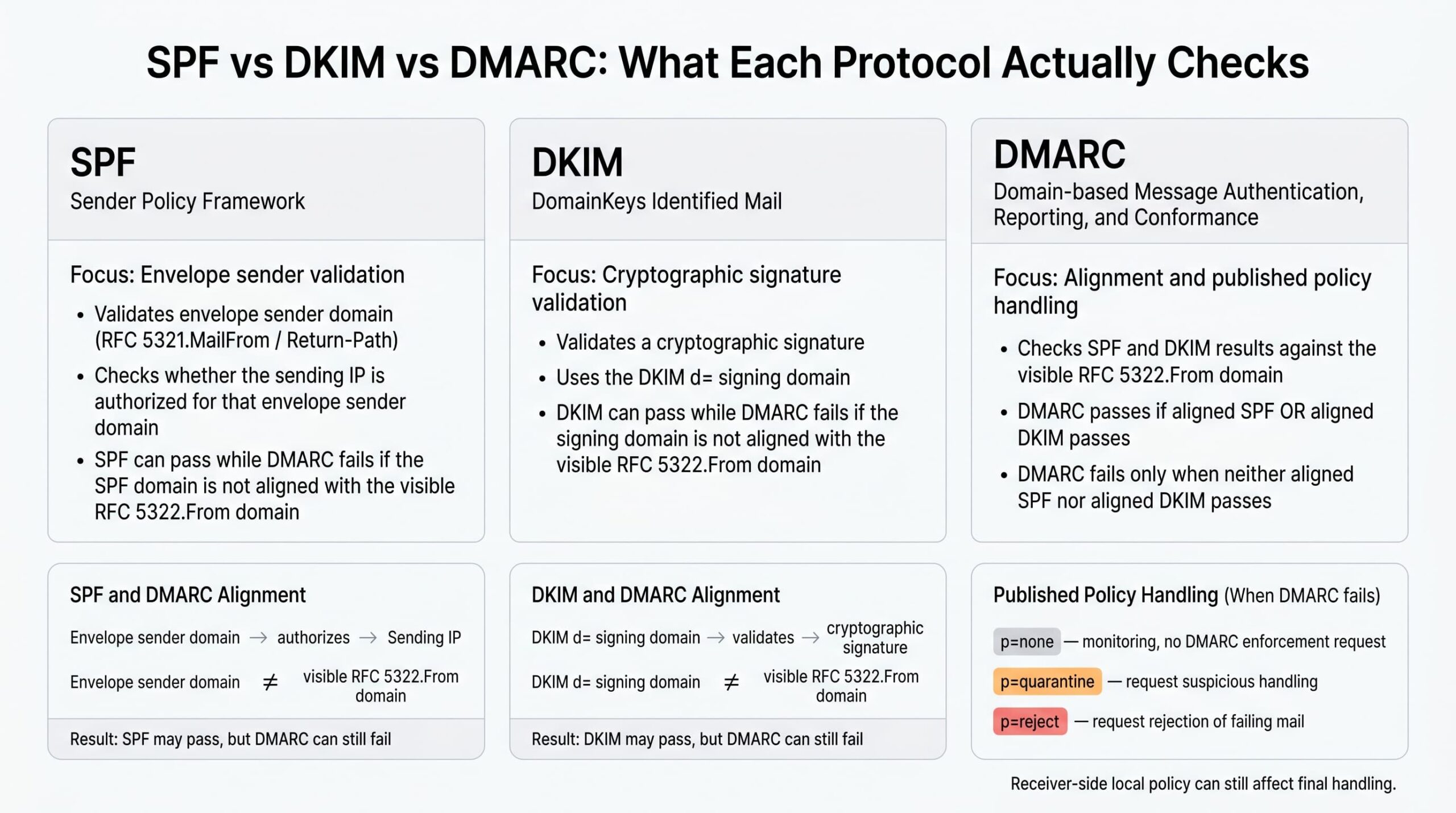
The three protocols are related but independent. Each answers a different question.
| Protocol | What it validates | Defined in |
|---|---|---|
| SPF | That the connecting IP is authorized to send mail for the envelope sender’s domain. | RFC 7208 |
| DKIM | That selected header fields and the canonicalized body hash covered by the DKIM-Signature verify against a DNS-published public key controlled by the signing domain. | RFC 6376, updated by RFC 8301; RFC 8463 adds Ed25519 |
| DMARC | That an SPF or DKIM pass is aligned with the domain in the visible RFC 5322.From header, and what to do if neither aligned mechanism passes. | RFC 7489 (Informational) |
SPF can evaluate both HELO/EHLO and MAIL FROM identities. DMARC consumes the SPF result for the RFC5321.MailFrom identity. When MAIL FROM is empty, SPF defines the checked MAIL FROM identity as a HELO-derived postmaster@<helo-domain> identity; this is the bounce-message case, not a separate DMARC use of arbitrary HELO results.
DKIM normally protects selected signed headers and the body hash, but the exact coverage depends on the signature. The rarely used DKIM l= body-length tag can intentionally sign only the first part of a body, so the safest operational wording is to inspect the actual DKIM-Signature and receiver verdict rather than assuming every byte of a delivered message was signed.
A message can pass SPF and still fail DMARC. If the envelope sender is bounce.esp-mailer.example but the visible From is noreply@example.com, SPF authenticates the wrong identity from DMARC’s perspective. The same applies to DKIM: a signature with d=esp-mailer.example verifies cryptographically, but the signing domain does not match the visible From domain, so DKIM alignment fails.
The Authentication-Results header, defined in RFC 8601, is the troubleshooting workhorse. Mail servers that perform authentication commonly write one of these headers into the delivered message, summarizing the SPF, DKIM, and DMARC verdicts and the identities used to compute them. When a message lands in junk or is rejected, this header is usually where the answer is. When troubleshooting, trust only the Authentication-Results header added by your own boundary MTA or by the final receiving system you are analyzing — Authentication-Results headers from untrusted upstream hops can be forged or stale, and RFC 8601 §5 describes why boundary systems should remove or ignore unauthenticated upstream Authentication-Results fields.
How DMARC works step by step
In plain English: the receiver looks up the visible From domain in DNS, finds a DMARC policy if one exists, checks whether SPF or DKIM passed in a way that ties back to the visible From domain, and then applies the published policy if neither aligned mechanism passed.
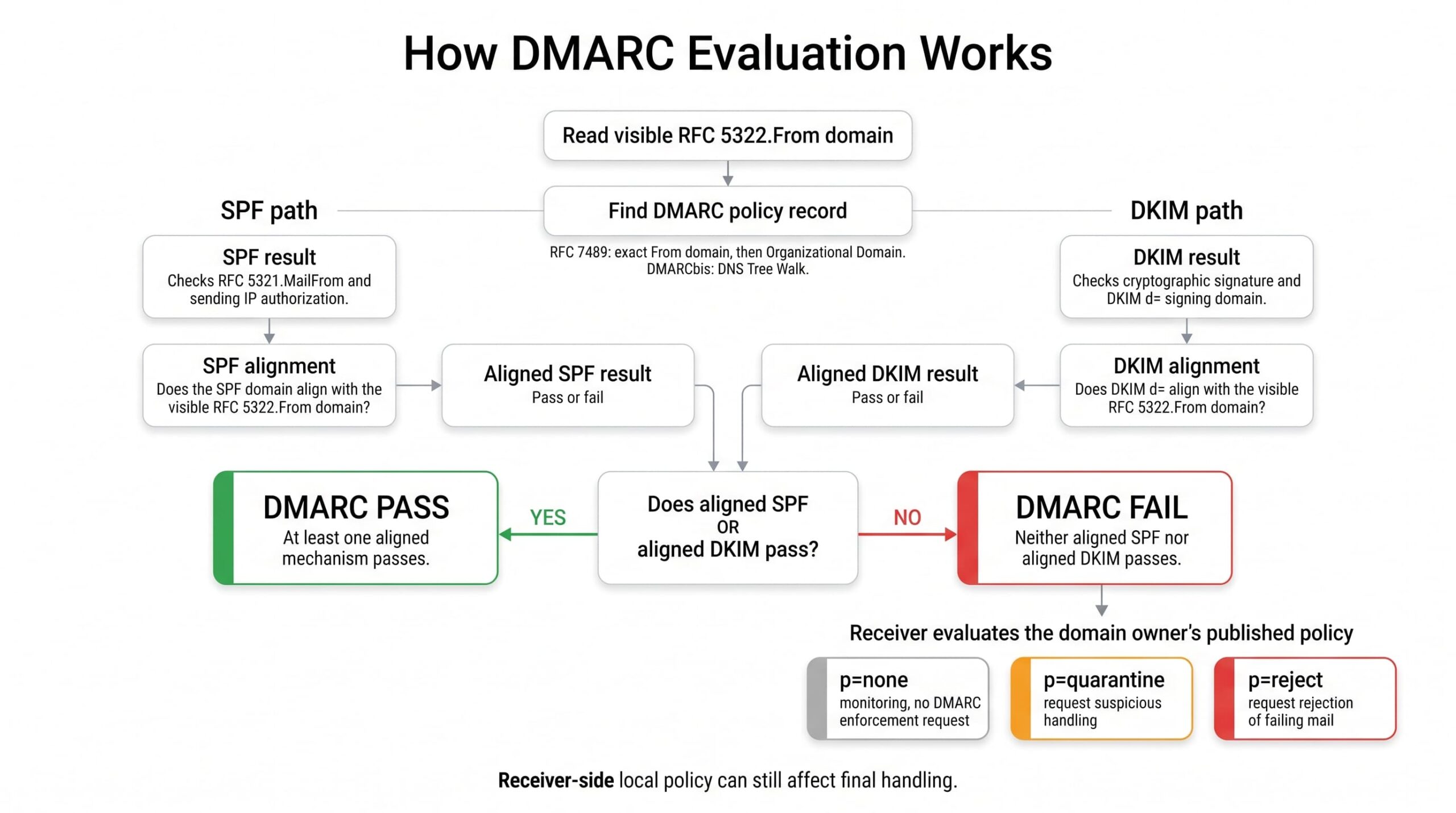
The technical evaluation, per RFC 7489 §6, proceeds roughly as follows:
- The receiver extracts the domain from the RFC 5322.From header.
- The receiver queries
_dmarc.<domain>for a TXT record. If none is found, it queries the same name on the organizational domain (derived in RFC 7489 using the Public Suffix List). Under DMARCbis, the PSL fallback is replaced by a bounded DNS Tree Walk; RFC 7489’s PSL behavior remains the deployed reality at many receivers until DMARCbis is published and adopted. - The receiver evaluates SPF on the message’s envelope sender and records the result.
- The receiver evaluates every DKIM signature on the message and records each result.
- The receiver tests SPF alignment: does the envelope sender domain match the From domain, under the policy’s
aspfmode? - The receiver tests DKIM alignment: does any verified signature’s
d=value match the From domain, under the policy’sadkimmode? - DMARC passes if either aligned SPF or aligned DKIM passes.
- If DMARC fails, the receiver consults the published policy (
p=orsp=for subdomains). - The receiver may apply
none,quarantine, orreject, optionally sampled bypct. - Local policy at the receiver — reputation systems, allowlists, ARC trust, content filtering — can override or supplement the requested handling.
Step 10 is critical and frequently misunderstood. The DMARC policy is a request, not a command. A receiver is free to honor it, ignore it, deliver to spam anyway, or apply additional ML-based scoring. Microsoft 365, Google Workspace, and large consumer mailbox providers each have their own local policy layers on top of DMARC. DMARCbis §5.4 strengthens this posture by saying that Mail Receivers SHOULD NOT reject incoming messages solely because of a published p=reject policy. Later receiver-handling and conformance text uses the stronger rule: Mail Receivers MUST NOT reject incoming messages solely because of a published p=reject policy, and in the absence of other knowledge and analysis are expected to treat failing mail as if p=quarantine applied.
Relaxed vs strict alignment
Alignment is what makes DMARC different from SPF and DKIM. There are two modes, controlled separately for SPF (aspf) and DKIM (adkim). The default for both is relaxed.
- Relaxed alignment requires that the two domains share the same organizational domain.
mail.example.comaligns withexample.com. - Strict alignment requires an exact domain match.
mail.example.comdoes not align withexample.com.
Consider a message with From: billing@example.com and these possible authentication identities:
| Identity | Value | Aligned (relaxed)? | Aligned (strict)? |
|---|---|---|---|
| SPF domain | bounce.example.com |
Yes — shares example.com |
No — not an exact match |
DKIM d= |
example.com |
Yes | Yes |
DKIM d= |
mail.example.com |
Yes — shares example.com |
No |
DKIM d= |
esp-mailer.example |
No | No |
Strict alignment is occasionally appropriate for high-value transactional domains (executive mail, payment notifications), but it commonly breaks legitimate mail when an ESP or relay signs with a subdomain or its own domain. Default to relaxed and only tighten after reports show your sending infrastructure can sustain it.
DMARC pass and fail scenarios
DMARC requires at least one aligned authentication pass. SPF and DKIM do not both need to pass under the DMARC protocol itself, but an unaligned pass does not help DMARC. Provider-specific sender requirements can be stricter; Microsoft’s high-volume consumer-mail requirements, discussed below, require both SPF and DKIM checks to pass and at least one aligned mechanism for DMARC validation.
| SPF result | SPF aligned? | DKIM result | DKIM aligned? | DMARC result |
|---|---|---|---|---|
| pass | yes | fail | no | pass |
| fail | no | pass | yes | pass |
| pass | no | pass | no | fail |
| pass | no | fail | no | fail |
| fail | no | fail | no | fail |
Reading Authentication-Results headers
When troubleshooting, read the receiver’s Authentication-Results header. A passing message might look like this:
Authentication-Results: mx.receiver.example;
  spf=pass smtp.mailfrom=bounce.example.com;
  dkim=pass header.d=example.com;
  dmarc=pass header.from=example.com
A message that passes SPF but fails DMARC because SPF is not aligned might look like this:
Authentication-Results: mx.receiver.example;
  spf=pass smtp.mailfrom=esp-mailer.example;
  dkim=fail header.d=example.com;
  dmarc=fail header.from=example.com
The exact syntax varies by receiver, but the operational question is usually the same: which domain passed authentication, and does it align with the visible From domain?
DMARC policies
The p= tag declares what the domain owner wants receivers to do with mail that fails DMARC. Three values are defined in RFC 7489:
p=none— monitor only. The domain owner is not requesting DMARC-based enforcement; receivers still apply their own spam, abuse, reputation, and policy filters. Ifruais set, participating receivers can send aggregate reports.p=quarantine— receivers should treat failing mail as suspicious. In practice this usually means routing to the spam or junk folder, but exact handling is receiver-defined.p=reject— the domain owner requests rejection of failing mail, typically during the SMTP transaction. The final handling still depends on receiver policy.
Two additional tags shape the policy:
pct=controls policy application sampling: it specifies what percentage of failing mail receives the requested policy. Per RFC 7489 §6.6.4, messages outside the sampled percentage are treated as if the next-lower policy applied:p=rejectdemotes top=quarantine,p=quarantinedemotes top=none, andp=noneis unchanged. Sop=reject; pct=10means “apply reject to 10% of failing mail; treat the remaining 90% as ifp=quarantine.” Forp=quarantine; pct<100, RFC 7489 §6.6.4 directs receivers to apply local message classification as normal to the unselected portion — effectively no DMARC-policy override — while normal receiver-side spam, reputation, and content filtering still applies. Aggregate reports cover evaluated traffic regardless ofpct;pctis not report sampling.sp=sets the policy for subdomains that do not publish their own DMARC record. If absent, subdomains inherit the parent’spvalue.
Local receiver policy can override any of this. Receivers can still use reputation systems, trusted-forwarder logic, allowlists, blocklists, content filtering, and abuse-detection models before making a final delivery decision. The published policy is the domain owner’s expressed handling preference, not a guarantee of universal receiver behavior.
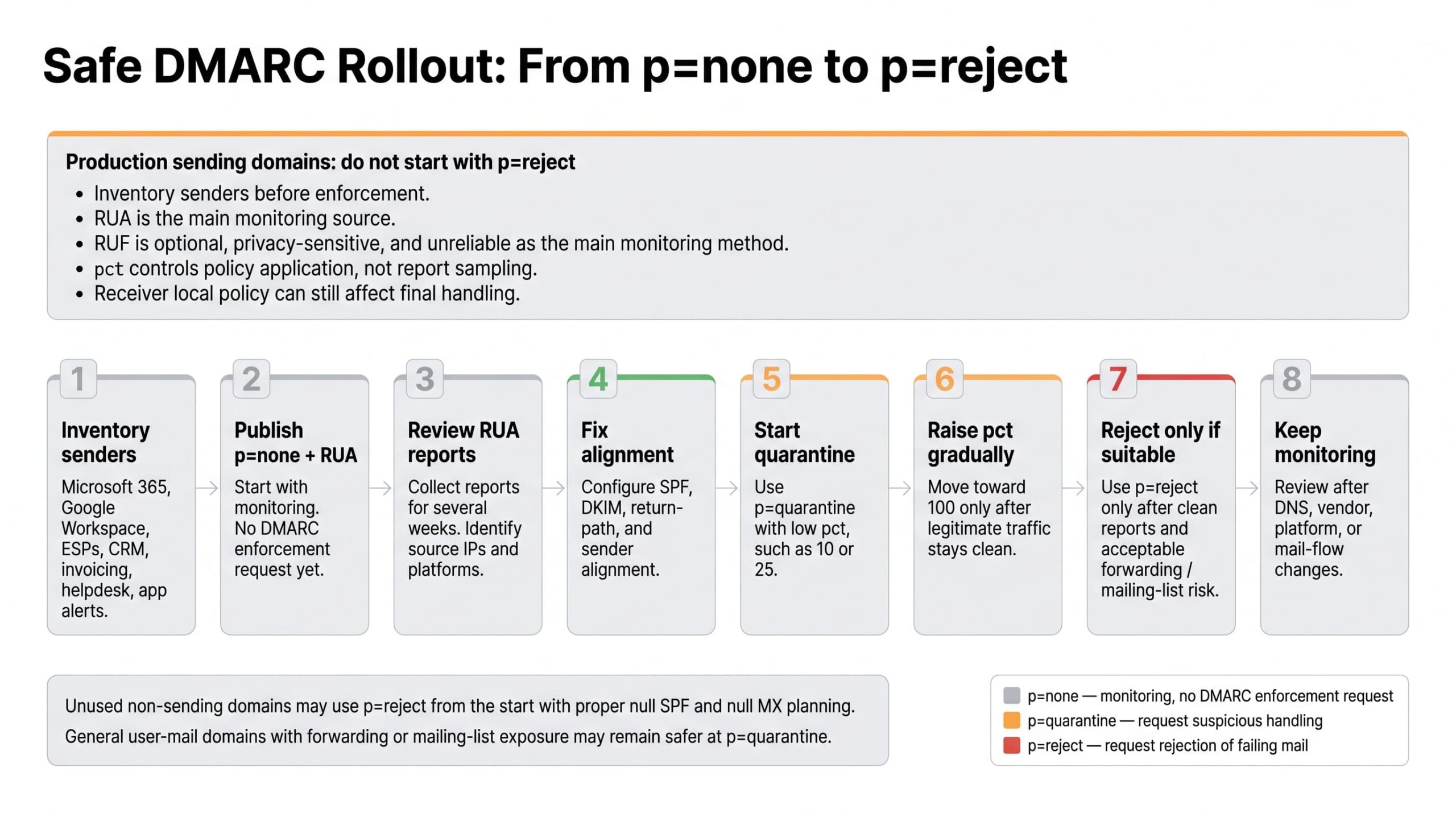
Safe policy progression
Going straight to p=reject on a production domain is a high-risk way to break legitimate mail. The safe rollout is methodical:
- Publish
p=nonewithruapointing to a mailbox or analysis service. Change nothing else. - Collect aggregate reports for at least two to four weeks. Identify every IP and platform sending on your behalf. For user-mail domains that might still be considered for
p=reject, DMARCbis recommends at least one month atp=none, then an equally longp=quarantineperiod, before comparing dispositions and deciding whetherp=rejectis tolerable. - Inventory legitimate senders. Compare against the report data. Anything legitimate that is failing alignment needs to be fixed before enforcement.
- Fix SPF includes, configure DKIM at each platform that supports it, and ensure the signing domain or return-path produces alignment with your visible From.
- Move to
p=quarantinewith a lowpct(10–25%). Watch reports. - Increase
pctgradually as failures from legitimate sources stay flat. - Move to
p=rejectonly when aggregate reports show that essentially all legitimate volume is aligned and passing, and only if the domain’s use case can tolerate the remaining forwarding and mailing-list risk. - Continue monitoring permanently. New SaaS tools, vendor changes, and shadow IT will introduce new sending sources over time.
Do not assume that Microsoft 365, Google Workspace, your ESP, your CRM, your invoicing platform, or your helpdesk are automatically aligned. They are not. Each must be configured to sign or send in a way that produces alignment with the From domain you intend to use.
For dedicated transactional, billing, security-alert, and parked domains, p=reject is often the right mature end state once reports are clean. For general-purpose user-mail domains where employees post to mailing lists or rely on forwarding paths, p=quarantine may be the safer final policy. Treat p=reject as a risk decision, not a universal maturity badge.
Under current RFC 7489 DMARC evaluation, a message can pass DMARC with either aligned SPF or aligned DKIM. However, for domains that choose p=reject, the DMARCbis draft adds stricter forward-looking guidance: such domains MUST NOT rely solely on SPF for a DMARC pass and MUST apply valid DKIM signatures, because SPF is fragile across forwarding and indirect mail flows. Until DMARCbis is published and materially adopted by receivers, treat this as draft-track operational guidance rather than a change to deployed RFC 7489 behavior.
What DMARC does not solve
DMARC is strong against direct spoofing of your visible From domain, but it is not a complete email security control. It does not solve:
- Compromised user accounts sending authenticated mail from legitimate infrastructure.
- Lookalike or cousin domains such as
examp1e.comorexample-billing.com. - Display-name spoofing where the attacker uses a different domain but a misleading sender name.
- Malicious attachments or URLs in messages that authenticate correctly.
- Inbox placement, sender reputation, spam complaints, or content filtering.
- Business email compromise from legitimate domains operated by attackers.
Practical readiness checklist before creating a DMARC record
- Inventory every system that sends email as your domain — primary mail platform, marketing ESP, CRM, ERP, support desk, transactional API, invoicing platform, monitoring alerts, and any application server that emits notifications.
- Validate the current SPF record syntax and confirm the DNS lookup count is well under the RFC 7208 limit of 10 lookups.
- Confirm there is exactly one SPF TXT record per domain. Multiple SPF TXT records at the same name make the SPF result
permerror, which prevents SPF from contributing to a DMARC pass. A message can still pass DMARC if aligned DKIM passes. - Confirm DKIM signing is enabled at every platform that supports it, and confirm the selector public-key records resolve.
- Verify alignment in test messages from each sending platform using a tool that exposes the
Authentication-Resultsheader. - Review forwarding paths (mailing lists, role-account forwarders, third-party gateways) for the impact discussed below.
- Decide where aggregate reports will go — an internal mailbox is workable for one or two domains, but most operational teams use a parsing service.
- Confirm DNS access and an appropriate TTL (300 to 3600 seconds is reasonable during rollout).
- Prepare a rollback plan: keep the prior TXT record value documented so you can revert quickly.
- Document every change in a configuration management system or runbook for audit and continuity.
Creating the _dmarc TXT record
The DMARC record is a TXT record published at the special hostname _dmarc.<your-domain>. It is not placed at the apex of the domain. The record value is a sequence of semicolon-separated tags beginning with v=DMARC1.
For a domain that sends production email and has never enforced DMARC, monitoring mode is the normal starting point:
_dmarc.example.com. 3600 IN TXT "v=DMARC1; p=none; rua=mailto:dmarc-reports@example.com"The same in monitoring mode but pointing reports at an external analysis vendor. The second record must be published by the report destination domain to authorize receipt of reports for example.com:
_dmarc.example.com. 3600 IN TXT "v=DMARC1; p=none; rua=mailto:dmarc@example-dmarc-vendor.example"
example.com._report._dmarc.example-dmarc-vendor.example. 3600 IN TXT "v=DMARC1"
An intermediate stage, applying quarantine to a quarter of failing mail with explicitly relaxed alignment:
_dmarc.example.com. 3600 IN TXT "v=DMARC1; p=quarantine; pct=25; rua=mailto:dmarc-reports@example.com; adkim=r; aspf=r"A strict reject configuration for a dedicated transactional, security-alert, parked, or otherwise tightly controlled domain whose legitimate senders are known, DKIM-signed, aligned, and whose owners have accepted forwarding and mailing-list risk:
_dmarc.example.com. 3600 IN TXT "v=DMARC1; p=reject; rua=mailto:dmarc-reports@example.com; adkim=s; aspf=s"With adkim=s or aspf=s, only exact-domain matches align. A message using From: billing@example.com will not get strict SPF alignment from MAIL FROM bounce.example.com, and will not get strict DKIM alignment from d=mail.example.com. Use strict alignment only after real receiver headers and aggregate reports confirm that the exact-domain identities match.
Quarantine at the parent with a stricter subdomain default (useful when subdomains are not expected to send mail):
_dmarc.example.com. 3600 IN TXT "v=DMARC1; p=quarantine; sp=reject; rua=mailto:dmarc-reports@example.com"Monitoring with multiple aggregate-report destinations. Each external organizational domain needs its own authorization record:
_dmarc.example.com. 3600 IN TXT "v=DMARC1; p=none; rua=mailto:dmarc-reports@example.com,mailto:dmarc-vendor@example.net"
example.com._report._dmarc.example.net. 3600 IN TXT "v=DMARC1"
Important constraints and warnings:
- If the report destination is in a different organizational domain from the policy, the destination domain must publish an external destination verification record. For reports sent to
dmarc@vendor.examplefromexample.com, the record isexample.com._report._dmarc.vendor.examplewith valuev=DMARC1. Reputable DMARC analytics services handle this automatically, but verify it after onboarding. - The
ritag is an optional RFC 7489 requested reporting interval. Receivers may ignore it, and many send aggregate reports approximately once per 24 hours regardless. The examples omitriandrfbecause they are optional and operationally weakly honored, not because DMARCbis is already universally deployed. Keep production records RFC 7489-compatible until DMARCbis is published and materially adopted by receivers. - Forensic reports (
ruf) are not widely supported and carry significant privacy implications because they can contain full message contents. Treat them as optional and unreliable for operations. - Never publish more than one DMARC TXT record at the same name. Under RFC 7489 policy discovery, if more than one DMARC policy record remains after parsing, DMARC policy discovery terminates and the receiver handles the message as if no DMARC policy record was found.
- Never place the record at the apex (
example.com). It must live at_dmarc.example.com.
DNS propagation, TTL, and verification
DNS TTL governs how long a recursive resolver caches a record. A TTL of 3600 (one hour) is reasonable for a steady-state DMARC record; during active rollout, dropping TTL to 300 lets you back out a change quickly. TTL is the cache lifetime, not a propagation guarantee — caches that already hold the old record will continue to use it until their copy expires.
Verification commands:
dig TXT _dmarc.example.comnslookup -type=TXT _dmarc.example.comFor a complete picture you usually want to confirm SPF and DKIM at the same time. Check the SPF record at the actual RFC5321.MailFrom domain used by each sending flow, not only at the visible From domain, and check every DKIM selector/domain pair used by your mail platforms:
dig TXT example.com
dig TXT bounce.example.com
dig TXT selector1._domainkey.example.com
dig TXT selector2._domainkey.mail.example.com
Third-party validators such as Google Admin Toolbox, MxToolbox, dmarcian, EasyDMARC, and others are useful for syntax linting and visualization, but they are diagnostic aids, not protocol authorities. For a delivery issue at a specific receiver, the receiver’s own Authentication-Results header is usually the most relevant evidence, provided you are reading a header inserted by that receiver and not an untrusted intermediary.
Full DMARC syntax breakdown
| Tag | Required | Default | Purpose |
|---|---|---|---|
v |
Yes | — | Protocol version. Must be the first tag and must equal DMARC1. |
p |
Yes for policy records; not used in external-report authorization records | — | Policy for the published domain: none, quarantine, or reject. |
sp |
No | Inherits p |
Policy applied to subdomains that have no DMARC record of their own. |
rua |
No | None | List of mailto: URIs to receive aggregate XML reports. Strongly recommended. |
ruf |
No | None | List of mailto: URIs to receive per-failure forensic reports. Support is limited; privacy-sensitive. |
pct |
No | 100 |
Policy application sampling — the percentage of failing mail to which the requested policy is applied. Per RFC 7489 §6.6.4, mail outside the sampled percentage is treated as if the next-lower policy applied: reject demotes to quarantine, quarantine demotes to none, and none is unchanged. For p=quarantine; pct<100, the remainder is treated as p=none from a DMARC-policy perspective, while normal receiver-side spam, reputation, and content filtering still applies. Aggregate reports cover evaluated traffic regardless of pct; pct is not report sampling. Note that DMARCbis (see below) deprecates this tag in favor of a binary testing flag. |
adkim |
No | r (relaxed) |
DKIM alignment mode: r relaxed, s strict. |
aspf |
No | r (relaxed) |
SPF alignment mode: r relaxed, s strict. |
fo |
No | 0 |
Failure reporting options: 0 report only if all mechanisms fail, 1 if any fail, d on DKIM failure, s on SPF failure. Affects ruf only. |
rf |
No | afrf |
Format for failure reports. In practice only afrf is meaningful. DMARCbis removes this tag. |
ri |
No | 86400 |
Requested aggregate reporting interval in seconds. Receivers may ignore it. DMARCbis removes this tag. |
Common mistakes worth calling out: omitting v=DMARC1 as the first tag, using malformed tag syntax, embedding the record at the apex rather than under _dmarc, publishing multiple TXT records at the same name, and relying on ruf for visibility when many receivers will not send forensic reports at all.
Aggregate reports vs forensic reports
Aggregate reports (RUA) are XML reports, commonly delivered as compressed attachments such as gzip or zip files. They are the primary operational mechanism for understanding what is happening to mail bearing your domain. A single report contains an envelope of report metadata, a summary of the policy that was applied, and one or more <record> blocks. Each <record> describes traffic from a single source IP, including:
- The source IP and message count for the reporting period.
- The disposition the receiver applied (
none,quarantine, orreject). - DKIM and SPF authentication results.
- The header From domain that was evaluated.
- DMARC-evaluated DKIM and SPF pass/fail results after alignment processing, plus raw authentication results where reported.
In the XML below, values under policy_evaluated reflect DMARC’s aligned-mechanism evaluation for that row; values under auth_results reflect raw SPF/DKIM authentication results reported by the receiver. Therefore, an unaligned SPF pass can legitimately appear as <spf>fail</spf> under policy_evaluated while appearing as <result>pass</result> under auth_results.
A trimmed, illustrative aggregate record:
<feedback>
  <report_metadata>
    <org_name>receiver.example</org_name>
    <email>dmarc-noreply@receiver.example</email>
    <report_id>20260512-abc123</report_id>
    <date_range>
      <begin>1778544000</begin>
      <end>1778630400</end>
    </date_range>
  </report_metadata>
  <policy_published>
    <domain>example.com</domain>
    <adkim>r</adkim>
    <aspf>r</aspf>
    <p>quarantine</p>
    <pct>25</pct>
  </policy_published>
  <record>
    <row>
      <source_ip>203.0.113.45</source_ip>
      <count>127</count>
      <policy_evaluated>
        <disposition>none</disposition>
        <dkim>pass</dkim>
        <spf>fail</spf>
      </policy_evaluated>
    </row>
    <identifiers>
      <header_from>example.com</header_from>
    </identifiers>
    <auth_results>
      <dkim>
        <domain>example.com</domain>
        <result>pass</result>
      </dkim>
      <spf>
        <domain>bounce.esp.example</domain>
        <result>pass</result>
      </spf>
    </auth_results>
  </record>
</feedback>
The data above is illustrative and does not describe any real organization.
RUA coverage is useful but not global. Only participating receivers send aggregate reports, some receivers suppress or aggregate details differently, and report delivery itself can fail. Treat RUA as the main operational telemetry source for DMARC, not as a complete census of every message sent with your domain.
Hand-parsing aggregate reports works for a single domain with a small number of senders. Beyond that, route reports into a parser, a managed DMARC-reporting service, or a SIEM pipeline that can normalize the XML and preserve historical trends. You can alert on signals such as:
- A new source IP that exceeds a volume threshold.
- A sudden spike in DMARC failures from a previously aligned source — typically the early sign of a misconfiguration after a vendor change.
- A new
header_fromsubdomain that has never appeared before. - A change in disposition counts after a DNS or platform change.
Failure reports (RUF) are separate, per-message, and contain message data including potentially the full headers. Many receivers do not send them. Some that do require additional authorization. They can be useful in narrow investigative scenarios but should not be the foundation of a monitoring strategy.
Microsoft 365 and Google Workspace considerations
Both platforms host vast amounts of business email but neither automatically gives you a working DMARC posture. Each requires explicit configuration per custom domain.
Microsoft 365. Microsoft’s official DMARC configuration documentation describes the workflow: SPF is published at your domain registrar (typically including spf.protection.outlook.com); DKIM is enabled per-domain through Microsoft Defender’s DKIM page, which provisions CNAME-based selector records you publish at your DNS provider; the DMARC TXT record is created at _dmarc.<domain>. Per RFC 7489’s policy discovery rules, a parent-domain DMARC record applies to subdomains that do not publish their own DMARC record, and Microsoft documents this inheritance behavior for Microsoft 365 domains. Note the special handling for the tenant’s *.onmicrosoft.com domain and for parked domains: both should be locked down with their own DMARC records pointing to a real report destination, even if you do not send mail from them, to make spoofing of those domains visible.
Microsoft 365 by itself is not a complete email security posture. Microsoft 365 admin configuration, mail flow rules, mailbox policies, and Defender for Office 365 cover the receive and policy side; DMARC alignment for outbound mail still depends on what your domain publishes in DNS and how each third-party sender is configured.
Microsoft has also announced separate sender requirements for its consumer mailbox services (Outlook.com, Hotmail.com, Live.com, msn.com). Per Microsoft’s 2025 announcement and Microsoft’s 550 5.7.515 NDR documentation, domains sending 5,000 or more messages per day to those consumer services must publish SPF and DKIM records, have both SPF and DKIM checks pass, publish DMARC with at least p=none, and have at least one DMARC-aligned mechanism. This is stricter than baseline DMARC, where one aligned authentication pass is sufficient for a DMARC pass. Non-compliant high-volume mail can receive SMTP rejections of the form 550 5.7.515 Access denied, sending domain [SendingDomain] does not meet the required authentication level.
Google Workspace. Google’s DMARC setup documentation and email sender guidelines describe enabling DKIM in the Admin console (which produces a TXT record to publish at the selector), authorizing Google Workspace in SPF with include:_spf.google.com while remembering that SPF alignment still depends on the envelope sender domain aligning with the visible From domain, and publishing a DMARC record at _dmarc. Google’s bulk-sender requirements apply specifically to senders delivering to personal Gmail accounts: senders that reach approximately 5,000 or more messages in a 24-hour period to those personal accounts are treated as bulk senders and must authenticate, align, publish DMARC, support one-click unsubscribe for marketing and promotional mail, and maintain acceptable spam rates. Google has stated that the threshold counts across the same primary domain, including subdomains. This is Google’s provider classification rule, not the DMARC Organizational Domain discovery algorithm, and bulk-sender classification does not expire automatically once it has been assigned. The mere fact that you send from Workspace does not satisfy these requirements; the domain must be configured.
Yahoo. Yahoo’s sender best practices describe similar expectations: implement SPF and DKIM, publish a valid DMARC policy with at least p=none, and ensure the From domain aligns with either the SPF or DKIM domain. Yahoo and Google announced aligned bulk-sender requirements in 2024; consult Yahoo’s documentation directly for the current thresholds and exact rules rather than relying on third-party summaries. Yahoo has also described its bulk-sender classification as pattern-based rather than pinned to one public daily message count. Yahoo’s sender FAQ adds a provider-specific DKIM caveat: when a message contains multiple DMARC-aligned DKIM signatures and not all of them pass, Yahoo does not guarantee that the message will pass DMARC.
For any of these platforms, custom domains and subdomains must be enrolled individually. Bulk-sending domains — marketing, billing, transactional — should be inventoried and authenticated separately from corporate-user mail. DMARC also does not replace mailbox security: MFA (ideally phishing-resistant MFA such as FIDO2 or WebAuthn passkeys), Conditional Access, log retention for forensic investigations, monitoring for inbox forwarding rules created by attackers, and an incident response process for compromised accounts are all complementary controls that DMARC does not substitute for.
Common DMARC problems and solutions
Email forwarding
Forwarding is the classic DMARC headache. When a recipient forwards a message — via a server-side forwarder, a mailing list, or a role account — the connecting IP at the next hop is the forwarder, not your authorized sender. SPF, evaluated on that new SMTP transaction, fails. DKIM may survive if the forwarder does not modify the message body or any signed headers; it often fails if the message is modified (footer injection by a mailing list, for example).
Two mitigations exist. Sender Rewriting Scheme (SRS) rewrites the envelope sender so that SPF can pass at the forwarder; SRS does nothing for DKIM and does not address DMARC alignment for the visible From. Authenticated Received Chain (ARC), defined in RFC 8617, lets each intermediary cryptographically attest to the original authentication results so a final receiver can trust the forwarder’s verdict even though SPF and DKIM no longer pass directly.
RFC 8617 is Experimental, not Standards Track. There is also active IETF discussion about ARC’s long-term status — specifically draft-ietf-dmarc-arc-to-historic (“Reclassifying ARC as Historic”), which replaced the earlier individual draft-adams-arc-experiment-conclusion. The current WG draft recommends that ARC no longer be deployed or relied upon between disparate senders and receivers. Receiver support is uneven, trust is per-sealer, and ARC should not be relied on as a general fix for arbitrary forwarded mail. RFC 7960 catalogs forwarding and other interoperability issues in detail.
Marketing ESPs
Most ESPs default to signing outbound mail with their own domain and using a shared return-path. Both fail DMARC alignment with your From. To fix this you need to:
- Configure a custom return-path (bounce domain) on a subdomain you control, with the ESP-supplied SPF or CNAME data.
- Configure a custom DKIM signing domain so the ESP signs with
d=a domain that organizationally matches your From. - Optionally set up a branded tracking domain.
- Send test campaigns and inspect the
Authentication-Resultsheader at the receiver before enforcing.
A frequent best practice is to keep marketing mail on a dedicated subdomain (news.example.com, marketing.example.com) so its reputation is isolated from corporate mail.
CRM, ERP, invoicing, ticketing, and helpdesk platforms
These platforms are the dark matter of email authentication. They often send transactional notifications, invoices, and customer responses using your domain in the visible From — sometimes via their own infrastructure, sometimes via SMTP relays, sometimes from shared IPs. For each one:
- Confirm the sender’s documented configuration steps for SPF inclusion and DKIM signing.
- Evaluate the impact on your SPF lookup count before adding includes — each
include:directive can recursively consume the 10-lookup budget. - Test that real outgoing messages produce aligned SPF or aligned DKIM.
- If a vendor cannot sign with your domain, route their traffic through a subdomain so a failure there does not jeopardize your primary domain’s reputation.
Subdomains
The organizational domain is the registered domain just below a public suffix (as derived from the Public Suffix List under RFC 7489; DMARCbis introduces a different mechanism — the DNS Tree Walk — discussed below). Each subdomain inherits its parent’s DMARC policy unless it publishes its own. sp= lets you set a different default policy for subdomains. A common pattern:
example.com— corporate user mail, usuallyp=quarantineorp=rejectdepending on forwarding and mailing-list exposure.marketing.example.com— ESP traffic with its own DMARC record matching the ESP’s alignment capabilities.billing.example.com— transactional mail,p=rejectonce stable.support.example.com— helpdesk replies, configured to align with the helpdesk vendor.
Splitting traffic this way contains reputation damage and gives you policy independence per use case.
Parked and unused domains
Every domain an organization owns but does not use for outbound mail is a spoofing target. Locking these down is one of the cheapest single security wins available, but it must be done deliberately: the records below only apply to a domain that genuinely does not send and does not receive mail. Do not apply these blindly to a domain that actually handles mail.
For a truly unused domain, publish three records:
- A null SPF record declaring that no host is authorized to send for the domain.
- A null MX (per RFC 7505) declaring that the domain does not accept mail.
- A strict DMARC record at
_dmarcwithp=rejectand a realruadestination so spoofing attempts are visible. If the domain publishes a null MX, do not pointruaat that same domain; reports must go to a mailbox that can actually receive mail.
Illustrative DNS for an unused domain:
example.com.                         3600 IN TXT "v=spf1 -all"
example.com.                         3600 IN MX  0 .
_dmarc.example.com.                  3600 IN TXT "v=DMARC1; p=reject; rua=mailto:dmarc-reports@example.org"
example.com._report._dmarc.example.org. 3600 IN TXT "v=DMARC1"
If the domain receives mail but does not send, omit the null MX and keep the null SPF and strict DMARC, with rua pointing to a working mailbox on that domain or to an authorized external report processor. If the domain sends mail at all, the unused-domain template does not apply — go through the staged rollout instead. Pointing rua at a real destination that accepts mail is what turns the lockdown from passive to actively monitored: without a report destination, spoofing attempts against your parked domains stay invisible. In the example above, example.org represents a separate reporting domain, so the external destination verification record is included.
Multiple SPF records
RFC 7208 §3.2 is explicit: a domain MUST have exactly one SPF record. Multiple TXT records each starting with v=spf1 at the same name yield permerror, which fails SPF and therefore fails SPF alignment under DMARC. Consolidate every authorized sender into a single SPF record. Watch the 10-DNS-lookup limit while doing so. SPF flattening — replacing include: mechanisms with literal IP ranges generated by a vendor service — is an option but introduces an operational dependency: when the vendor’s upstream IPs change, your flattened record must be regenerated, or mail will silently start failing.
Broken DKIM
The usual DKIM failure modes are: missing or wrong public-key record at the selector; mail-gateway modifications (anti-virus footers, link rewriting, content rewriting) that invalidate the signature; the wrong signing domain (so the message technically has a valid signature but does not align); rotated keys not propagated to DNS; and expired or revoked keys.
DKIM is specified in RFC 6376, with RFC 8301 (Standards Track) updating its cryptographic baseline — rsa-sha1 is forbidden, the minimum RSA signing key size is 1024 bits, and 2048-bit RSA is recommended for long-lived keys. RFC 8463 additionally registers ed25519-sha256 as a supported DKIM algorithm. Before using Ed25519 operationally, verify support across your sending platform, intermediate gateways, and target receivers. A 2048-bit RSA public key exceeds the 255-octet limit on a single DNS character-string and must be published as multiple quoted strings inside a single TXT record; verifiers concatenate the strings before parsing. Test after any change to mail flow — particularly after introducing a new gateway, anti-malware product, or hybrid Exchange configuration.
Compromised accounts
DMARC does nothing to stop legitimate authenticated mail from a compromised mailbox. If an attacker has the user’s credentials and sends from Microsoft 365 or Google Workspace through the normal outbound path, the message will be properly SPF- and DKIM-aligned. DMARC is the wrong control for that threat. The right controls are phishing-resistant MFA, Conditional Access policies that restrict where and how users can authenticate, least-privilege role assignments, periodic review of mailbox forwarding and inbox rules (a frequent attacker persistence mechanism), log retention with alerting on anomalous send patterns, and a documented incident response process.
DMARC as part of broader cybersecurity controls
DMARC is one control in a layered email security program — neither sufficient on its own nor a substitute for mailbox, endpoint, network, and incident-response controls. From a governance and audit perspective, DMARC aggregate reports can provide useful evidence of email authentication coverage, third-party sender inventory, and ongoing monitoring of systems that send using your domain. Do not overstate this evidence: DMARC reports show participating receivers’ authentication evaluations, not a complete census of all global mail activity.
That perspective is useful when justifying the work to a non-technical stakeholder, but it should not be overstated. DMARC does not provide data protection in transit (use TLS, MTA-STS, and TLS-RPT for that), does not detect malware, does not prevent account compromise, and does not block lookalike domain phishing. Combine it with vulnerability remediation, configuration management discipline on the mail stack, continuous monitoring of authentication failures, and user training on phishing recognition.
Hypothetical rollout scenario
The scenario below is hypothetical and uses illustrative numbers. It is not based on any specific real organization.
Initial state. A mid-sized company runs Microsoft 365 for corporate mail on example.com. SPF exists but includes nine vendors; DKIM is enabled only on the default onmicrosoft.com domain; there is no DMARC record. Customer-facing transactional mail comes from a SaaS billing platform sending as example.com; marketing campaigns go through an ESP sending as example.com; the helpdesk replies through a ticketing tool sending as example.com.
Phase 1, weeks 1–2. Engineering enables DKIM signing for the custom domain in Microsoft 365 (CNAME records published, signing turned on once the records resolve). They publish v=DMARC1; p=none; rua=mailto:dmarc@example.com and route reports into a DMARC analytics service. The first reports surface fifteen distinct sending IP ranges. Most are expected (Microsoft 365, the ESP, the billing platform, the ticketing tool). Three are not — two are legacy on-premises servers nobody had documented, and one is a developer-test sandbox.
Phase 2, weeks 3–6. The undocumented senders are reviewed. The on-prem servers are migrated to relay through Microsoft 365 with the appropriate connector authentication; the test sandbox is moved off the production domain to a sandbox subdomain. The ESP is reconfigured for a custom return-path and custom DKIM signing domain; alignment for marketing traffic goes from 0% to nearly all. The billing platform is reconfigured for DKIM with a domain-aligned signing identity. The ticketing tool is configured similarly. SPF is reviewed; two unused vendor includes are removed to bring the lookup count to seven.
Phase 3, weeks 7–10. The policy is moved to v=DMARC1; p=quarantine; pct=10; rua=.... Aggregate reports continue to be reviewed weekly. After two clean weeks, pct moves to 25, then 50, then 100.
Phase 4, week 11+. With reports showing essentially all legitimate volume aligning on at least one mechanism, and after confirming that the domain’s forwarding and mailing-list risk is acceptable, the policy is moved to p=reject. Marketing traffic is split off onto news.example.com with its own DMARC record so a future marketing-tool change cannot disturb corporate mail. Continuous monitoring continues; the team adds an alert for any new source IP exceeding a daily threshold.
Lessons. The biggest risks were not technical — they were the undocumented systems found only because aggregate reports made them visible. Without the monitoring phase, the move to enforcement would have silently broken those flows. None of the percentages or counts in this scenario should be read as outcome guarantees; they are operationally plausible but specific to this hypothetical setup.
2025–2026 trends and adjacent standards
Several developments are worth tracking as of May 2026.
DMARCbis. As of 13 May 2026, draft-ietf-dmarc-dmarcbis-41 is listed by IETF Datatracker with IESG state RFC Ed Queue and RFC Editor state AUTH48, with intended status Proposed Standard. Until an RFC number is assigned and the document is published, treat it as an Internet-Draft in transition and check Datatracker for the current state. The draft is intended to obsolete RFC 7489 and RFC 9091 if approved. The headline change is that DMARCbis replaces the Public Suffix List as the mechanism for determining the organizational domain with a DNS Tree Walk, removing the dependency on an external, manually maintained list.
DMARCbis companion drafts. DMARCbis splits the protocol work into three documents: the main DMARCbis specification, aggregate reporting, and failure reporting. As of 13 May 2026, the main DMARCbis draft is listed by IETF Datatracker with IESG state RFC Ed Queue and RFC Editor state AUTH48. The aggregate-reporting and failure-reporting drafts are also in the RFC Editor path as separate IETF DMARC Working Group documents (draft-ietf-dmarc-aggregate-reporting and draft-ietf-dmarc-failure-reporting), both with IESG state RFC Ed Queue and RFC Editor state RFC-EDITOR. Until RFC numbers are assigned and the documents are published, treat all three as drafts in transition. No immediate parser change is expected solely because aggregate reporting was split into a companion document, but operators ingesting reports should track the final aggregate-reporting RFC before treating parser behavior as frozen.
DMARCbis tag changes. DMARCbis also retires three RFC 7489 tags and introduces three new ones. pct is replaced by a binary testing flag t=: t=y requests that receivers apply the policy one level below the specified p / sp / np value (so p=reject; t=y is treated as quarantine, and p=quarantine; t=y as none); t=n (the default) requests the specified policy as-is. Operational experience showed that intermediate pct values were implemented inconsistently across receivers — in practice only pct=0 and pct=100 were reliable — so the working group dropped percentage-based sampling in favor of an unambiguous on/off testing signal. ri and rf are also removed, both for similar reasons (receivers ignored ri, and only one rf value was ever defined). On the additions side, np= declares a policy for non-existent subdomains (NXDOMAIN responses), closing a gap that lets attackers spoof random made-up subdomains; psd= formalizes the Public Suffix Domain marker, originally introduced experimentally in RFC 9091, so that registries like gov.uk can publish meaningful policy. Existing v=DMARC1 records remain valid — DMARCbis receivers ignore unknown tags, and RFC 7489 receivers ignore the new ones — but production deployments should remain RFC 7489-compatible until DMARCbis is published and materially adopted by receivers. Treat t=, np=, and psd= as transition items to monitor and test, not as universal receiver behavior today.
Gmail, Yahoo, and Outlook sender requirements. Google’s bulk-sender requirements apply to senders delivering close to 5,000 or more messages in a 24-hour period to personal Gmail accounts; Google’s sender guidelines FAQ states that messages sent from the same primary domain (including subdomains) count toward that threshold and that bulk-sender classification does not expire automatically. Google requires bulk senders to authenticate with SPF and DKIM, publish a DMARC policy, meet alignment requirements, support one-click unsubscribe for marketing and promotional mail, and maintain acceptable spam rates. Yahoo publishes similar sender best practices: implement SPF and DKIM, publish a valid DMARC policy with at least p=none, and ensure the From domain aligns with either the SPF or DKIM domain. Microsoft announced sender requirements for Outlook.com / Hotmail.com / Live.com / msn.com consumer mailboxes in 2025: domains sending 5,000 or more messages per day to those services must publish SPF and DKIM, have both checks pass, publish DMARC, and have SPF and/or DKIM align for DMARC validation; non-compliant mail can receive SMTP 550 5.7.515 rejections.
BIMI. Brand Indicators for Message Identification is currently an IETF Internet-Draft, not an RFC. It does not strengthen authentication by itself — it relies on existing SPF, DKIM, and DMARC. The current draft requires a strong DMARC policy on both the Organizational Domain and the From: domain: p=reject, or p=quarantine with an effective pct=100, and any subdomain policy (sp) MUST NOT be none. How BIMI will treat DMARCbis’s t=y testing flag in place of pct=0 is not yet settled in the BIMI draft. Mailbox providers decide whether and how to display the indicator, and production logo display at several major providers also requires a Verified Mark Certificate (VMC) or Common Mark Certificate (CMC), which is a separate cost and process from the DNS configuration itself.
MTA-STS and TLS-RPT. RFC 8461 (MTA-STS) and RFC 8460 (SMTP TLS Reporting) protect mail in transit between MTAs by enforcing TLS and reporting on failures. They are independent of DMARC but commonly deployed alongside it as part of a complete email security posture.
Implementation checklist
- Identify every legitimate sender of mail using your domain in the visible From.
- Validate your SPF record syntax and DNS lookup count; remove any duplicate SPF TXT records.
- Enable DKIM at every supporting platform, with a signing domain that aligns with your From.
- Confirm SPF alignment and DKIM alignment for representative messages from each platform.
- Publish
_dmarc.<domain>withp=noneand a realruadestination. - Lock down parked and unused domains with null SPF, null MX (if they do not receive mail), and
p=rejectDMARC pointing at a real report destination. - Collect aggregate reports for several weeks. Ingest them into a parser or service.
- Investigate every sending IP that appears in reports. Resolve unknowns before any policy change.
- Test transactional mail end to end from Microsoft 365 or Google Workspace, ESP, CRM, invoicing, helpdesk, and any other system.
- Move to
p=quarantinewith a lowpct; monitor; increase gradually. - Move to
p=rejectonly when reports confirm legitimate traffic is clean and the domain’s forwarding/mailing-list risk is acceptable; otherwise documentp=quarantineas the final policy for that domain. - Continue monitoring permanently. Re-review SPF, DKIM, and DMARC after any mail-flow change, vendor change, or domain addition.
- Document DMARC posture as part of security assessment and compliance evidence.
Conclusion
DMARC is not a one-line DNS edit. It is an iterative operational practice: inventory, instrument with monitoring, fix what reports surface, enforce gradually, and keep watching. The starting point is p=none with reporting; the mature destination depends on the domain’s function. Dedicated transactional and parked domains often belong at p=reject, while general-purpose user-mail domains may remain safer at p=quarantine when mailing lists or forwarding are unavoidable. Skipping the middle is how legitimate email outages happen.
Treated this way, DMARC is a high-value control. It reduces direct spoofing of the visible From domain, provides ongoing visibility into participating receivers’ evaluations of mail using your domain, and produces useful supporting evidence of authentication coverage, subject to receiver participation and report-delivery limits. Combined with SPF, DKIM, MFA, Conditional Access, MTA-STS, TLS-RPT, log retention, user training, incident response, and continuous monitoring, it is part of a defensible email security program. By itself, it is not. Configure it accordingly.
Sources
- RFC 7489 — Domain-based Message Authentication, Reporting, and Conformance (DMARC), Informational
- RFC 7208 — Sender Policy Framework (SPF)
- RFC 6376 — DomainKeys Identified Mail (DKIM) Signatures
- RFC 8301 — Cryptographic Algorithm and Key Usage Update to DomainKeys Identified Mail (DKIM)
- RFC 8463 — A New Cryptographic Signature Method for DomainKeys Identified Mail (DKIM)
- RFC 8601 — Message Header Field for Indicating Message Authentication Status
- RFC 8617 — Authenticated Received Chain (ARC) Protocol, Experimental
- RFC 8461 — SMTP MTA Strict Transport Security (MTA-STS)
- RFC 8460 — SMTP TLS Reporting
- RFC 7960 — Interoperability Issues between DMARC and Indirect Email Flows (mailing lists, forwarders, gateways, intermediaries)
- RFC 7505 — A “Null MX” No Service Resource Record for Domains That Accept No Mail
- RFC 8553 — DNS Attrleaf Changes: Fixing Specifications with Underscored Node Name Use
- RFC 8616 — Email Authentication for Internationalized Mail
- RFC 9091 — Experimental DMARC Extension for Public Suffix Domains
- IETF Datatracker — draft-ietf-dmarc-dmarcbis (DMARCbis, Internet-Draft)
- IETF Datatracker — draft-ietf-dmarc-aggregate-reporting
- IETF Datatracker — draft-ietf-dmarc-failure-reporting
- IETF Datatracker — draft-ietf-dmarc-arc-to-historic
- IETF Datatracker — draft-adams-arc-experiment-conclusion
- IETF Datatracker — Brand Indicators for Message Identification (BIMI), Internet-Draft
- Microsoft Learn — Use DMARC to validate email, setup steps
- Microsoft Learn — DMARC reporting for MOERA and parked domains
- Microsoft Tech Community — Outlook’s requirements for high-volume senders
- Microsoft Support — Fix NDR error 550 5.7.515 in Outlook.com
- Google Workspace Admin Help — Help prevent spoofing and spam with DMARC
- Google Workspace Admin Help — Email sender guidelines
- Google Workspace Admin Help — Email sender guidelines FAQ
- Yahoo Sender Hub — Sender best practices and requirements
- Yahoo Sender Hub — Sender FAQs